You Are Not Ready for Open Source Just Because You Want to Start
A practical, field-tested path for becoming useful in open source: build fundamentals, join communities, communicate clearly, reproduce issues, and learn from real review.
You are not ready for open source just because you want to start. You are ready when you can open a real codebase and not panic.
Most people skip this part. They jump directly into issues, spam "good first issue," copy-paste some AI-generated patch, and then wonder why their PR gets ignored. The truth is simple: open source does not reward excitement alone. It rewards preparation.
First, sharpen your axe
Before you start contributing, spend months building your fundamentals. Not days. Not one weekend. Months.
Learn how real apps are structured. Learn how data flows from the frontend to the backend. Learn why files live where they live. Learn how APIs talk to databases. Learn what auth really does. Learn why state management becomes messy. Learn why deployment breaks at the worst possible time.
This is the boring phase. But this is also the phase that quietly changes everything.
Because once your fundamentals are strong, a codebase stops looking like random files and starts looking like a system.
Build one real thing first
Before touching a serious open-source repo, build one proper project of your own. Not a todo app.
Build something that has real parts: TypeScript, React, auth, state, API routes, Prisma, PostgreSQL, deployment, and actual user flows.
Something messy enough to teach you pain. Something real enough to break. Something serious enough that another engineer could review it and not immediately say, "This is tutorial code."
Because until you have built something real, you will not understand why maintainers care so much about small details.
Do the shadow-build
This is the part that changed everything for me. I thought I was ready. I had watched tutorials. I had written React. I felt kind of confident. Then I opened a real open-source repo, and suddenly it felt like I was reading another language.
That was the moment I realized I was not ready. So I went back.
I started cloning a project from Code With Antonio, but I added one rule for myself: I would not just copy the project. I would build my own idea in parallel.
Whatever I built in the clone, I had to translate into my own product. If the clone had database work, I had to design the schema for my own idea. If the clone had frontend work, I had to build my own version of that flow. If the clone had auth, API routes, deployment, or state management, I had to understand it deeply enough to apply it somewhere else.
The loop was simple.
- Clone.
- Understand.
- Translate.
- Build your own.
It was slow. It was frustrating. It was brutal. But it worked.
Because after a point, I was no longer copying code. I was understanding decisions. I was seeing patterns. I was learning how real builders think.
And when I opened that scary open-source repo again, it finally started reading like English.
This matters even more now
In the AI era, everyone can generate code. That is not the hard part anymore.
The hard part is knowing what code should exist in the first place.
LLMs can write a function for you, but they will not magically give you taste. They will not teach you why a system is designed a certain way. They will not make you good at reading unfamiliar codebases. They will not tell you when not to build something.
AI can help you move faster. But fundamentals decide whether you are moving in the right direction.
The real moat
Open source is not about rushing into random issues. It is about becoming useful inside someone else's system.
And to become useful, you need fundamentals, one real project, and enough patience to sit with a codebase until it stops feeling scary.
In the AI era, fundamentals are the moat. AI is the multiplier. Sharpen the axe first. Then go contribute.
Now you are ready to actually start open source
If you have fulfilled the points above, then yes, now you are ready to start open source. But not randomly. Not blindly. With direction.
The next step is to join a good open-source community, or aim for a structured program like Google Summer of Code or Linux Foundation Mentorship. Most people suggest these programs for a reason. Open source is vast. It has too many organizations, too many repositories, too many projects, and too many threads. When you are starting out, you need direction, and these programs give you that. They give you mentors, project ideas, timelines, communication channels, and a reason to stay consistent.
But before you even start finding issues on GitHub, do one thing first. Join the community.
Communication matters more in the AI era
Find the organization's communication channel. It could be Discord, Slack, Matrix, a mailing list, GitHub Discussions, or whatever the community uses.
This matters more than people think. Right now, because of AI, anyone can go to GitHub, pick an issue, ask an LLM for help, and open a PR. Code is not the rare part anymore. The rare part is communication, community engagement, and trust.
If mentors or admins know you, if they have seen you attend meetings, ask thoughtful questions, test things properly, and communicate clearly, that matters a lot. Even if you have fewer PRs, you can still stand out more than someone who silently opened many PRs but never attended a meeting, never talked to mentors, never understood the project, and never became part of the community.
Open source is not just code. It is communication. It is trust. It is showing up.
Observe the community before picking a project
Once you join the community, do not immediately ask someone to assign you an issue. First, observe.
See how the community works. See who the active mentors are. See which mentors are actually excited about their projects. Watch which projects are discussed often. Look at GitHub activity. Are PRs being reviewed? Are issues being discussed? Are maintainers replying? Is the repo active or dead?
If the project is active and mentors are present, use your brain and pick that project. Do not pick a dead repo just because it looks easy. You want a project where people are present, because when people are present, you learn faster.
Clone the project and feel the real pain
After picking the project, clone it locally. And listen carefully.
The first time you set up a real open-source project locally, it will be painful. Dependencies will break. Docs may be outdated. Some command will fail. Your OS may behave differently. You will fix one thing and another thing will break.
It is not hard. It is just new.
Keep going. Once the project runs locally, do not jump into coding immediately. First, understand the codebase. Use AI properly here. Ask it to explain the project architecture. Ask it to explain the folder structure. Ask it how the data flows. Ask it where the frontend talks to the backend. Ask it to trace one feature end to end. Ask it to make a short internal doc for you.
Then read that doc with the code open. Do not blindly trust it. Use it as a map. That is how the codebase slowly stops looking like a jungle.
Stop waiting only for good first issues
Most people say, "Start with good first issues." That is okay advice, but it is not the full truth.
This is a real project. Not every serious open-source organization has perfectly labeled beginner issues. In fact, many good organizations do not have beginner-friendly issues waiting for you, and that is completely fine.
You have already spent time building your own projects. You have already learned fundamentals. You have to get out of the mindset that you always need a beginner-level issue.
Look for real issues. If an issue is opened by a mentor or maintainer, that is a good signal. It usually means the issue is real, relevant, and worth solving. But even then, do not blindly trust any issue.
Reproduce it locally. That is the key. Can you reproduce the bug on your machine? Does the issue actually exist? Can you trigger the behavior? Can you understand where it breaks?
If yes, now you have something real to work on. A lot of random issues do not even exist anymore. Sometimes the project changed. Sometimes the bug was already fixed indirectly. Sometimes the reporter misunderstood the behavior. Sometimes the issue is too vague.
So before solving anything, reproduce it. Once you can reproduce an issue locally, you are already ahead of most beginners.
Learn only what the issue demands
You do not need to know everything before contributing. You do not need perfection. You need enough curiosity to solve the problem in front of you.
Pick an issue. Reproduce it. Then ask yourself what you need to understand to solve it. Maybe you need to understand one API. Maybe one component. Maybe one database flow. Maybe one platform-specific behavior. Maybe one old design decision.
Learn that specific thing. Search about it. Read the docs. Ask AI. Read old PRs. Look at similar code in the repo. Ask mentors only after doing your homework.
Eventually, you get more context. Then the issue starts making sense. Then the fix becomes possible.
And when you repeat this pattern again and again, your context about the codebase increases. Your horizon increases. The codebase becomes less scary.
That is how open source compounds.
A real example from my own journey
One example from my own journey is a Joplin PR where I had to work on a global shortcut to show or hide Joplin.
When I started, I did not know how to implement global shortcuts properly. I had never deeply worked with that part before. So I studied it. I asked AI. I read the code. I already had some context about the Joplin repo because I had been contributing to it for around a month, and that context helped a lot.
I knew where things should probably be called from. I knew how the desktop app was structured. I knew Joplin runs on Windows, macOS, and Linux.
So I also knew one thing clearly: I could not just implement it and test it on one platform. I had to make sure it worked everywhere.
It had to work on Windows. It had to work on macOS. It had to work on Linux.
I implemented the shortcut and tested it. It worked on Windows. It worked on macOS. But on Ubuntu Wayland, it did not work.
One issue opened ten more doors
At first, I only knew the surface-level thing: Wayland does not support global shortcuts in the same way because of security reasons in its protocol. That itself was new learning for me.
I started with, "I need to implement a shortcut." Suddenly, I was learning about X11, Wayland, GNOME, Electron, desktop portals, Linux desktop environments, and platform-specific edge cases.
This is what open source does. You pick one issue. Then the real world opens ten more doors.
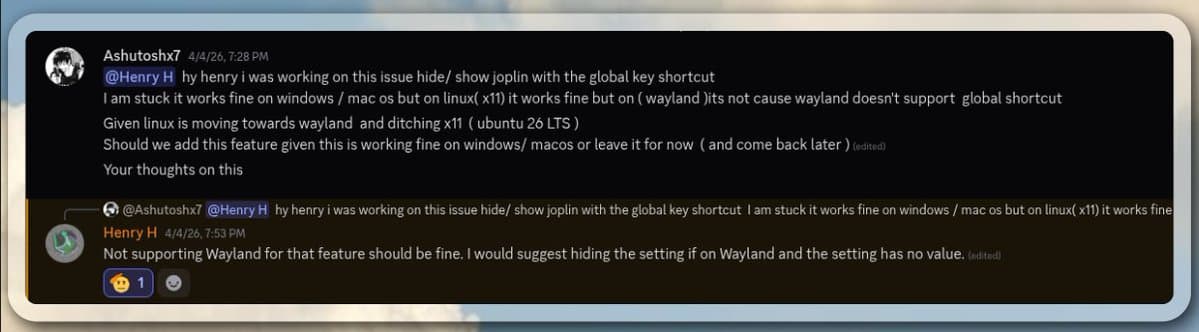
I talked to the mentor about it. The suggestion was practical: if it works on X11, Windows, and macOS, keep that support. For Wayland, hide the setting if the feature cannot work properly.
So I did that and opened the PR.
Then the PR discussion went deeper
After that, another maintainer pointed something out in the PR itself. He asked why it does not work on Wayland and mentioned that there are desktop portal APIs where this could potentially work.
And honestly, at that moment, I did not have the complete answer. I only had partial understanding.
This is where many beginners panic, but this is normal. You will not always have the answer immediately. The important thing is not whether you know everything on day one. The important thing is what you do next.
Do you defend your half-knowledge? Or do you go back and study? I went back and studied.
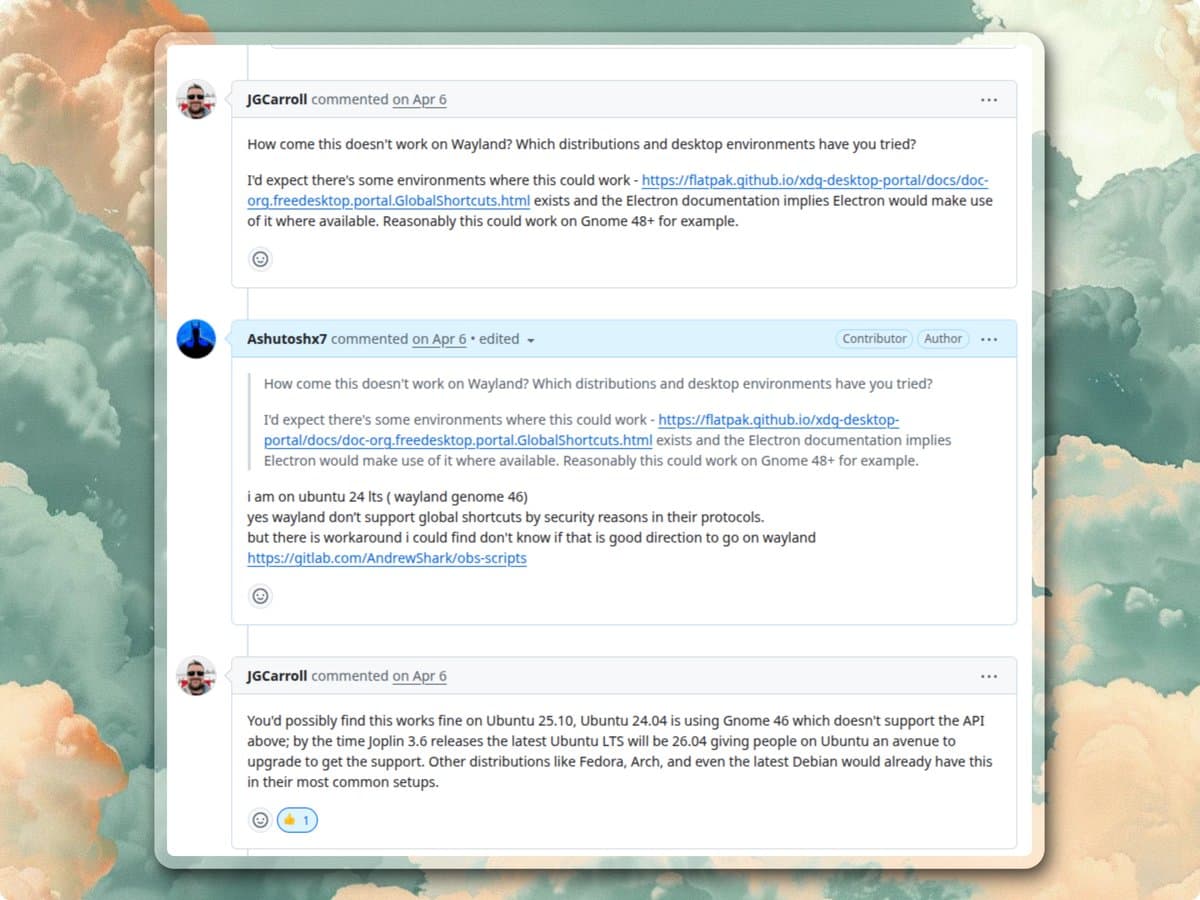
At first, I replied with what I knew. I was on Ubuntu 24 LTS with GNOME 46. Wayland did not support global shortcuts in the way Electron was trying to register them. I found some workaround scripts, but I was not sure if that was the right direction for Joplin.
Then the maintainer added more context. He mentioned that this could possibly work on Ubuntu 25.10, and that Ubuntu 24.04 uses GNOME 46, which does not support the required API. By the time Joplin 3.6 releases, the latest Ubuntu LTS would be 26.04, giving Ubuntu users a path to upgrade. Other distributions like Fedora, Arch, and newer Debian setups may already have this in common environments.
Now the problem was deeper. It was no longer just, "Wayland does not support global shortcuts."
It became: which GNOME version supports the portal? Which Electron version uses it? What does Joplin currently use? What should we do until the ecosystem catches up?
So I tested more. I literally switched from Ubuntu 24 to Ubuntu 26 beta to test the behavior again.
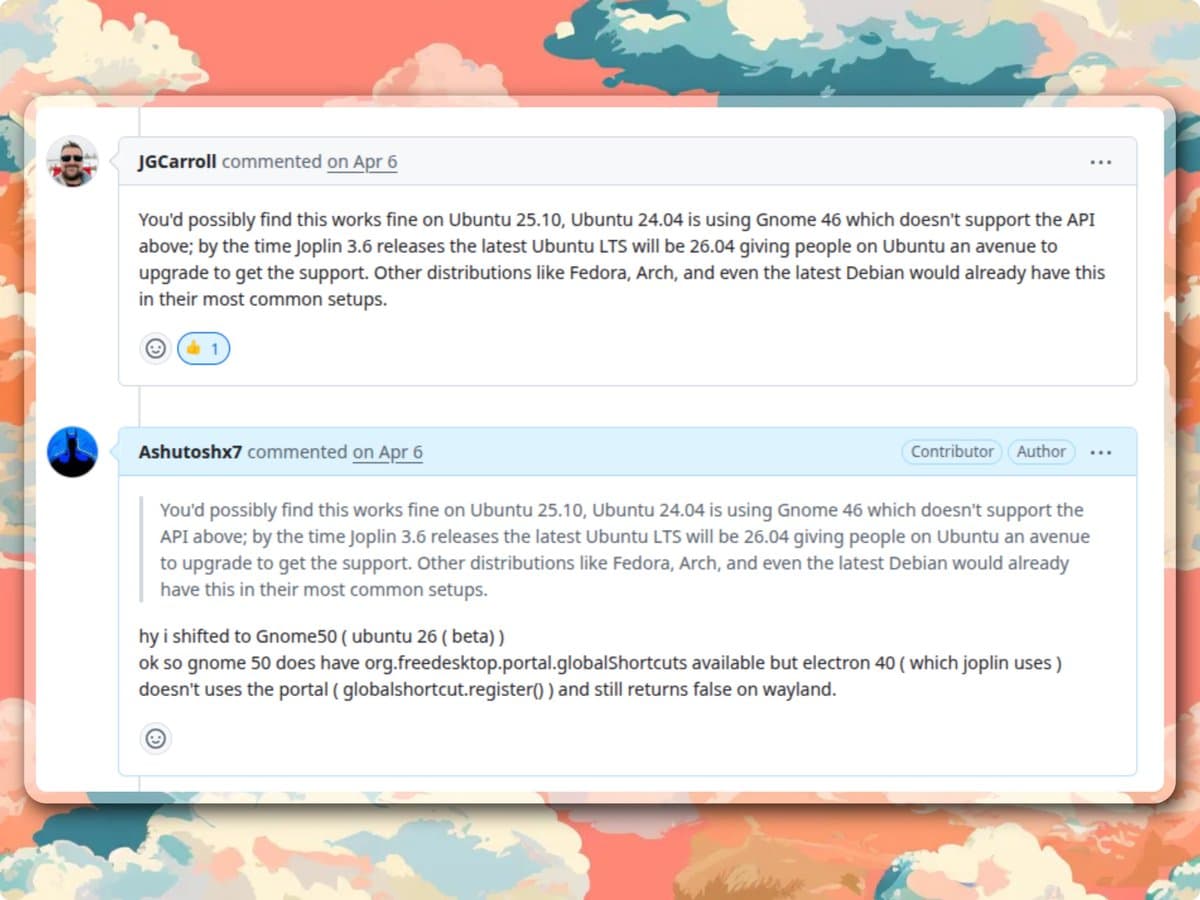
Still, it did not work.
Then I researched more and found the real detail: GNOME 50 does have org.freedesktop.portal.GlobalShortcuts available, but Electron 40, which Joplin uses, does not use the portal through globalShortcut.register() yet. So even though the portal exists on GNOME 50, Electron still returns false on Wayland.
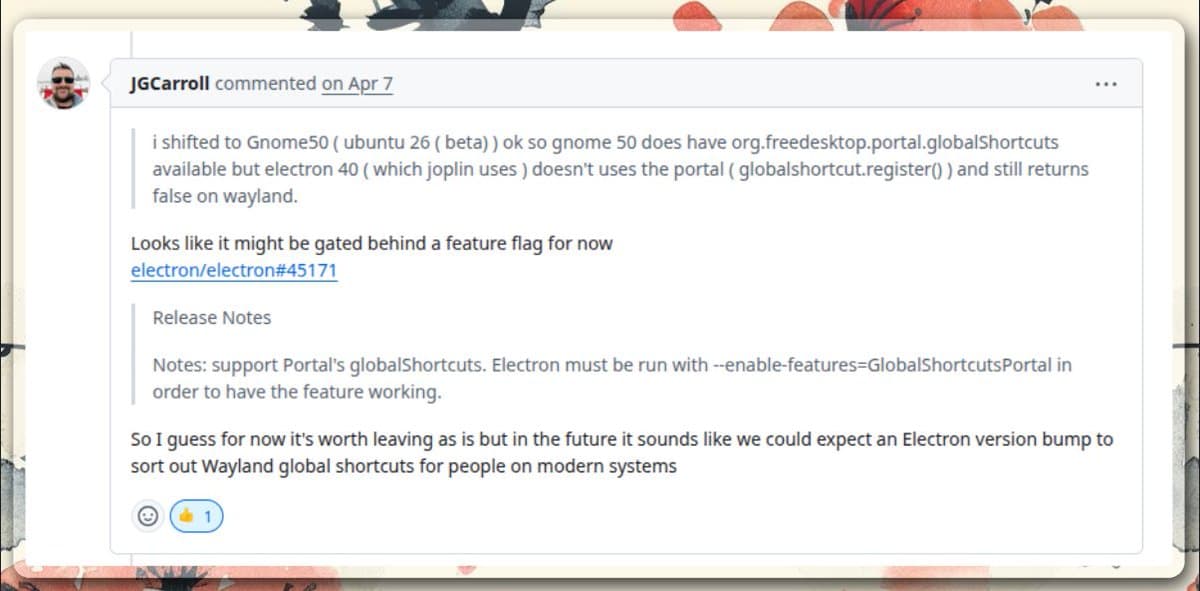
Not just: Wayland does not work. But: GNOME has the portal, Wayland needs portal-based support, but Electron 40 does not use that portal for globalShortcut.register() yet, so Joplin cannot fully support it through the current Electron behavior.
That is a much better answer. And I only reached that answer by making a mistake, getting questioned, going back, testing again, and studying more.
That is how the learning actually happens
See how the learning increases point by point?
First, I learned about global shortcuts. Then I learned that Joplin needs cross-platform behavior. Then I learned that Windows and macOS worked. Then I learned that Ubuntu Wayland did not. Then I learned about Wayland security restrictions. Then I learned about X11. Then I learned about GNOME versions. Then I learned about desktop portals. Then I learned that Electron 40 does not use the portal yet.
This is the real value. The PR is not just a PR. It expands your horizon.
And this knowledge stays with you. It will help in the next open-source project. It will help in the next desktop app. It will help in the next bug.
This is why open source is powerful. You learn by doing real things in real codebases with real constraints.
Maintainers respect learning behavior
You do not need to know everything. You need to be honest. You need to test. You need to communicate. You need to go back and study when you do not know something.
I made mistakes in that PR. I did not have the full answer immediately. But I kept learning. I tested more. I came back with better context.
That is what maintainers respect. Not fake confidence. Not AI-generated explanations. Real effort. Real testing. Real learning.
Read PR conversations, not just code
Here are a few more PRs from my own journey that are worth reading if you want to understand how open-source work actually flows.
Joplin PR #14582
A feature-request conversation with tradeoffs and review discussion.
Joplin PR #14443
A small formatting lesson that reinforces checking your diff before pushing.
Sugar Labs Music Blocks PR #6062
A community-driven PR where meeting context and testing helped the work land quickly.
Feature work is not just writing code. There are tradeoffs. There is back and forth. There is discussion about behavior. You need to understand what maintainers actually want, not just what you want to build.
Small lessons matter too. In one PR, I learned that VS Code can add formatting changes when you commit. Small thing? Yes. But this is exactly how open source teaches you. You make a change, review points something out, you realize your editor changed extra files, and then you learn to check your diff properly before pushing. That lesson stays.
For the Sugar Labs Music Blocks PR, we had a discussion in the meeting. Testing mattered a lot. I showed the behavior, discussed it, tested it properly, and because the context was clear, the PR got merged quickly.
That builds reputation. People remember who tests properly. People remember who communicates. People remember who shows up in meetings. People remember who can be trusted.
And when selection time comes for programs like GSoC or LFX, reputation matters.
Selection is not only about PR count
This is something beginners need to understand. More PRs does not always mean better.
Someone with fewer PRs but strong communication, proper testing, consistent community presence, and trust from mentors can stand out more than someone who silently opened many random PRs.
Mentors are not only selecting code. They are selecting a person they may work with for months.
So they care about how you communicate. They care about whether you show up. They care about whether you understand the project. They care about whether you can learn when stuck. They care about whether you can take review without ego. They care about whether you are reliable.
That is why community engagement matters.
The actual open-source loop
By this point, you should understand how solving an issue really goes.
You do not become good by waiting until you know everything. You become good by entering a real codebase and learning through real problems.
- Join the community.
- Observe the project.
- Find active mentors.
- Pick an active repo.
- Clone it locally.
- Set it up.
- Use AI to understand the architecture.
- Find a real issue.
- Reproduce it.
- Study what the issue demands.
- Fix it.
- Test it.
- Open the PR.
- Discuss.
- Make mistakes.
- Learn from those mistakes.
- Improve.
- Repeat.
Every time you do this, your horizon increases. Every issue makes the codebase less scary. Every review sharpens your taste. Every mistake teaches you something real. Every conversation improves your engineering communication.
And all of this stays with you. That is how you actually grow in open source.